One advantage of digital delay-based effects is the ability to repeatedly rewrite a delay line without any losses. While this makes for a clean digital delay sound which is unwanted in some cases it add the ability to “freeze” delays or delay-based effects such as reverbs creating infinite sustain. In this blog post i shed some light on this surprisingly simple mechanism.
Theory
Basically every delay-based audio effect is potentially “freezable”. On prerequisite is that the shortest delay involved should be 1/20 of second (20Hz, the lowest audible frequency) duration or more to retain the original pitch of the frozen signal. If we keep repeating a shorter bit of audio the pitch is dominated by the length of the delay line instead of the content of the delay line. This would be granular synthesis, which is interesting in it’s own right but not what we’re looking for right now. Also the feedback should be adjustable in the effect itself to somehow determine the duration of the effect.
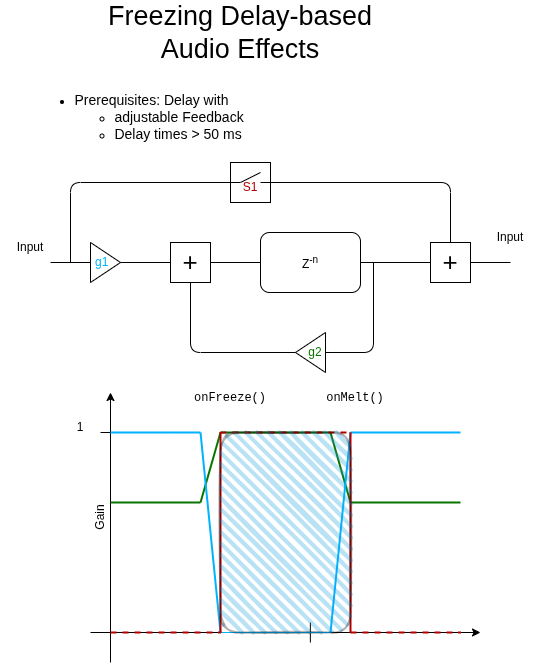
The simplest topology for a freezable effect is a simple delay line (z^-n) return the past n-th sample in the familiar z-plane (infinite but discrete sampled time-domain). Some portion of the delayed signal is amplified (g2) and fed back to get repeating delays. A virtual switch (s1) and another gain stage (g1) have to be added to allow for a gradual change between a “frozen” and and “melted” stage which avoids unwanted clicks and artifacts.
When the freeze process is initiated the input gain into the delay line is reduced to zero and the feedback gain is increased to 1. Once the feedback is at 1 the switch s1 is engaged allowing the input signal to bypass the delay line creating the ability to play over the frozen bit.
When melting, the process is reversed.
Some findings
- Freezing sounds best when multipled delays with different delay length are involved
- Generally any processor inside the feeback loop should be bypassed as well to create a static freeze effect. However leaving a mild low- or highpass might create insteresting evolving textures.
- Changing the delay while frozen generates some nice manipulating capabilities delving into glitch or bitcrunch territory
Software
Check the following files for the overall structure and a specific implementation case (delay)
https://github.com/StoneRose35/cortexguitarfx/blob/daisySeed/Inc/pipicofx/FxProgram.hpp
https://github.com/StoneRose35/cortexguitarfx/blob/daisySeed/Inc/pipicofx/005_Delay.hpp
https://github.com/StoneRose35/cortexguitarfx/blob/daisySeed/Src/pipicofx/FxProgram.cpp
https://github.com/StoneRose35/cortexguitarfx/blob/daisySeed/Src/pipicofx/005_Delay.cpp
https://github.com/StoneRose35/cortexguitarfx/blob/daisySeed/Src/common/audio/delay.c
